

Discord, Upwork, Jasper AI, and Dropbox Sign all run on Webflow. These aren’t small startups testing a new tool. They’re established brands that chose Webflow over WordPress, Wix, and Framer for their entire web presence.
But why do these brands trust their online identity to Webflow? They could have used Framer for a visually perfect website, or WordPress for scalability, or even Wix for ease. But brands like Discord and Upwork still chose Webflow.
Webflow isn’t just another site-builder. It’s a powerful no-code website builder that turns a visual canvas into real HTML, CSS, and JavaScript, ready to go live. With built-in hosting, security, and Webflow CMS, it acts as an all-in-one website builder that scales even if you are launching a startup, running a marketing site, or building a full-blown brand presence.
In this detailed blog, we’ll dig into how Webflow works, what makes it better than others, and why more businesses are using it to build fast, flexible, and future-ready websites.
Quick Summary
- Webflow website builder is a professional no-code website builder that turns visual design into clean, production-ready code with built-in hosting, SEO, performance, and security.
- It works as an all-in-one website builder with Webflow CMS, advanced design tools, real-time collaboration, and scalable workflows for startups, agencies, and enterprises.
- Teams choose Webflow to launch faster, manage content easily, and avoid plugin issues or complicated development cycles.
- This article explains how Webflow works, how it compares with WordPress, Framer, and Wix, and why modern brands trust it for flexible, future-ready websites.
Key Takeaways
- Webflow gives you full design freedom without writing code, making it a powerful no-code website builder for professional brands.
- The Webflow website builder combines hosting, security, SEO, interactions, and Webflow CMS in a single platform designed for scalability.
- Businesses choose Webflow because it helps launch websites faster, cuts developer dependency, and keeps everything easy to maintain.
- Agencies, startups, and content teams benefit most since Webflow supports collaboration, clean code output, and future-ready no-code web design workflows.
What is Webflow?
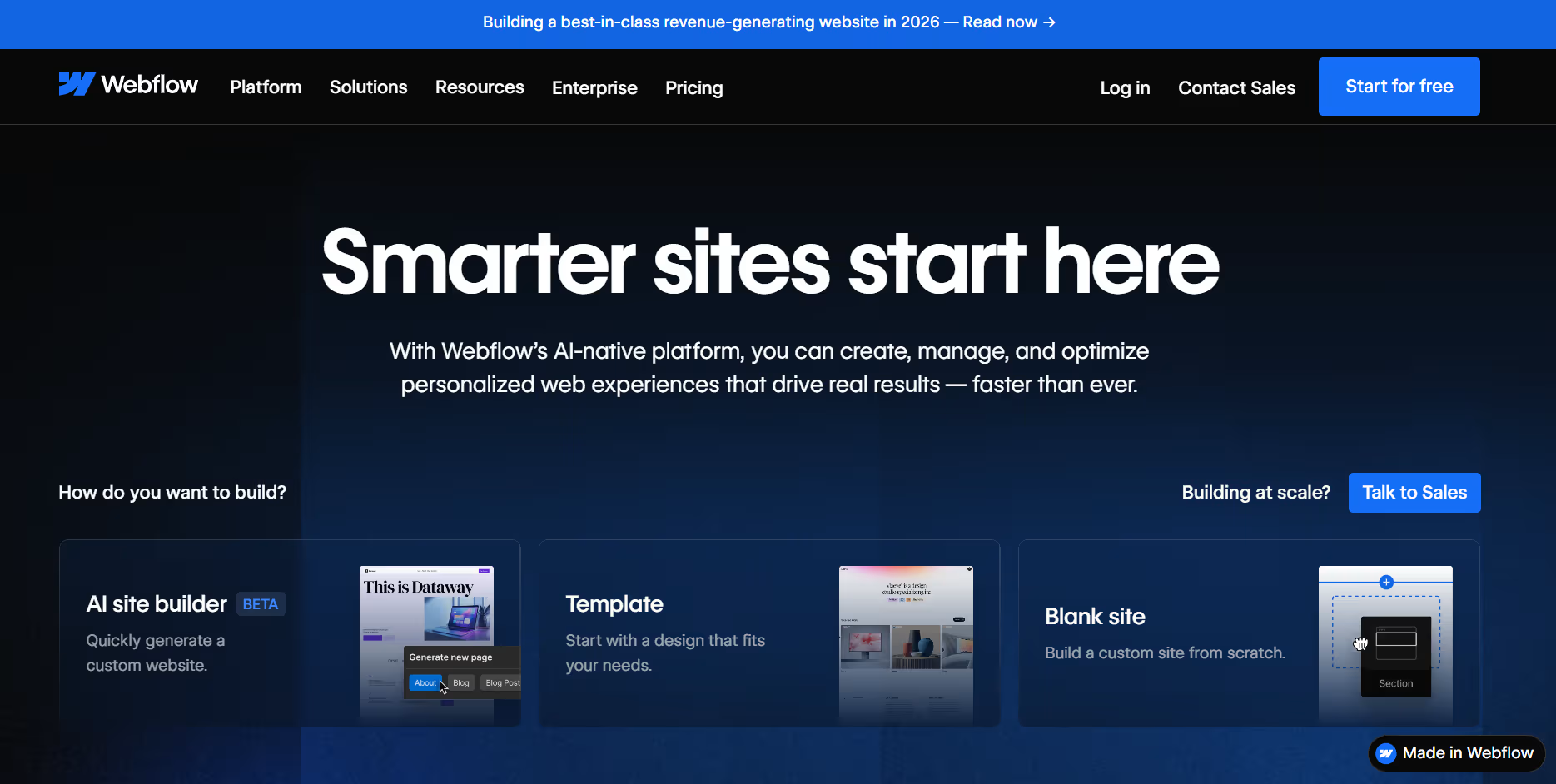
Webflow is a visual website builder and CMS that lets users design, build, and publish sites without writing code. Designers work in a familiar drag-and-drop editor similar to Figma or Photoshop to lay out elements, set styles, and define interactions.
Webflow then generates clean, semantic HTML/CSS/JS from these designs behind the scenes. In simple terms, this means anyone can create a fully responsive, custom website on a visual canvas, while Webflow handles the code, hosting, and performance optimizations.
For example, major brands like Rakuten have adopted Webflow to achieve faster builds and better security with full design control, all without writing backend code. In short, think of Webflow as the bridge between design tools like Figma and live websites. You design visually, Webflow writes the code, and your site goes live with professional-grade hosting included. No developer handoffs. No plugin chaos.
Core Features of Webflow Website Builder
The Webflow website builder comes with everything a modern brand needs to design, scale, and manage a high-performing website. And that too built directly inside the single platform. Here are the core Webflowfeatures that make it such a strong all-in-one website builder:
Visual Designer
- What it does: A visual drag-and-drop interface with pixel-level control and responsive breakpoints.
- How it works: You place elements, style them, and add animations or interactions powered by GSAP and Lottie, while Webflow converts everything into clean semantic HTML and CSS.
- Why it matters: You get production-ready code through no-code web design, achieving developer-level results without writing code.
Content Management (CMS):
- What it does: Lets you create structured Collections for dynamic content such as blogs, portfolios, or product catalogs.
- How it works: You design a template once, and Webflow automatically populates content with fields like text, images, categories, and metadata. SEO controls like meta tags and redirects are built in.
- Why it matters: Content teams can publish and update pages anytime without breaking design, keeping websites scalable and brand-consistent.
Built-in Hosting & Security
- What it does: Provides global, enterprise-grade hosting with automatic SSL and top-tier performance.
- How it works: Webflow uses a global CDN network (Fastly on AWS, moving to Cloudflare) to deliver fast load speeds, backups, and DDoS protection automatically.
- Why it matters: You publish instantly, and Webflow handles uptime, performance and security without plugins or server setup.
E-Commerce:
- What it does: Enables online stores with custom product pages, checkout, and catalog management.
- How it works: You visually design storefronts, define products and variants, configure shipping and tax, and integrate Stripe or PayPal for payments.
- Why it matters: You build unique e-commerce experiences inside one platform, with support for thousands of products and zero transaction fees on higher plans.
Collaboration & Workflows
- What it does: Allows multiple people to build and review websites together.
- How it works: Real-time multi-user editing, comment-only links for feedback, and safe client editor roles keep design and content aligned.
- Why it matters: Agencies and marketing teams launch faster without delays, handoffs, or accidental design changes.
Developer Tools
- What it does: Gives developers flexibility when projects need advanced customization.
- How it works: You can add custom HTML, CSS, JS, use APIs, embed code, or even import React components while Webflow keeps hosting and performance optimized.
- Why it matters: Teams move faster, handling the visual build in Webflow while still enabling technical enhancements when required.
AI & Analytics (Innovation)
- What it does: Adds AI-powered building, optimization tools, and built-in analytics to support smarter website creation.
- How it works: AI helps generate layouts or content from prompts, while Webflow Analyze provides performance insights and SEO recommendations directly inside the Webflow website builder.
- Why it matters: Teams automate key tasks like SEO optimization and conversion tracking, making Webflow a future-ready no-code website builder that helps websites perform better with less manual effort.
What makes Webflow Different From Other Website Builders?
The Webflow website builder stands out because it gives full design freedom while still generating clean, production-ready code. But Framer, Wix, Squarespace, and even WordPress are also no-code to some extent. So, what makes Webflow different? Here is a full overview followed by a detailed comparison.
| Freedom Without Limits Most website builders lock you into rigid templates. Webflow gives you a blank canvas with pixel-perfect control over every element, such as grid, flexbox, and custom CSS, without theme restrictions. You’re not adapting your vision to fit a template; you’re building exactly what you imagine. |
| Everything in One Platform Webflow bundles hosting, CMS, security, and SEO tools natively. Compare this to WordPress, where you need third-party hosting, multiple plugins for SEO, and constant updates to keep everything compatible. Webflow eliminates that plugin chaos entirely, with fewer moving parts and more predictable performance. |
| Clean Production Code Webflow automatically generates clean, standards-compliant code from your designs. Many other no-code tools produce bloated or unclear code. By design, Webflow’s output is optimized for SEO and speed. Reviews emphasize that this yields faster load times and better Google rankings than many plugin-based builders. In short, you get the simplicity of visual design with the professionalism of hand-coded sites. |
| Scalability & Collaboration Webflow targets professional use-cases. It supports large-scale sites (thousands of pages or products) with advanced features like role-based permissions and multi-stage publishing. New real-time collaboration and design-system tools (like the Component Canvas) are unmatched by simpler DIY builders. This makes Webflow appealing to agencies and enterprises that need workflow management – something you rarely see in consumer-grade tools. |
| Emerging AI & Future-Ready Tools Webflow is rapidly integrating AI into its core. Features like AI-powered site generation, automated SEO workflows, and experimentation (1:1 personalization with Optimize) keep Webflow ahead of the curve. Other builders (e.g. Wix’s AI wizard) focus on basic automation, but Webflow’s AI is geared toward professional-grade tasks (A/B testing, rich analytics). This forward-looking tech is why many consider Webflow to be leading the future of web design. |
Webflow Vs. Other Website Builders
Webflow vs WordPress
| Criteria | Webflow | WordPress |
| Setup and Maintenance | Visual no-code experience with hosting, security, SEO and CMS included in one platform. Requires minimal maintenance. | Needs separate hosting and many plugins for security, SEO and features. Maintenance is more hands-on. |
| Design Flexibility | Full visual control with custom layouts. Ideal for design-first websites without coding. | Very high customization using themes and plugins. Good for deeply customised or content-heavy sites. |
| Hosting, Security and Performance | Built-in hosting, automatic SSL and performance optimisation. Publishing is instant. | Depends on hosting provider and plugin quality. Performance and security vary based on setup. |
| SEO and Code Output | Generates clean, semantic code with native SEO tools for better performance and rankings. | High SEO potential but dependent on plugins. Too many add-ons can slow down performance. |
| Best Use-Cases | Custom marketing sites, portfolios, business websites, design-centric brands. | Large blogs, complex workflows, or highly custom functionality with many integrations. |
Winner:
- Choose Webflow if you want a modern Webflow website builder experience that simplifies design, hosting, and SEO.
- Choose WordPress if you need highly complex, long-form content sites and do not mind maintaining plugins and hosting yourself.
Webflow vs Framer
| Criteria | Webflow | Framer |
| Purpose and Focus | Production-ready websites with hosting, design, CMS, scalability and SEO in one platform. | Great for prototyping, animations and landing pages. Primarily a design tool for smaller builds. |
| CMS and Content Management | Has built-in Webflow CMS for dynamic content and structured collections across large sites. | Limited content management. Not ideal for large websites with lots of pages. |
| SEO and Performance | Clean code output and integrated hosting for strong SEO performance. | Basic SEO features. Less suitable for long-term growth. |
| Speed for Simple Sites | Slight learning curve but fully flexible design. | Very fast to launch simple designs with basic structure. |
| Scalability | Scales from small to enterprise-level websites. | Better for small projects without heavy content or expansion plans. |
Winner:
- Choose Framer for fast launch landing pages and prototypes.
- Choose Webflow for no-code web design that is scalable, structured and ready for real growth.
Webflow vs Wix
| Criteria | Webflow | Wix |
| Ease of Use | Offers more creative control and precise layout options. Slightly higher learning curve. | Very beginner-friendly with simple drag-and-drop editing. |
| Design and Customization | High flexibility for custom and unique designs. | Easy to use but limited for advanced design needs. |
| SEO and Technical Foundation | Built-in performance features and advanced SEO controls. Clean semantic code. | SEO features exist but not as deep or flexible for professional projects. |
| Growth and Scalability | Supports business growth and content expansion without limits. | Good for small and simple sites. Can become restrictive as a business grows. |
| Best For | Agencies, brands and startups focused on quality and long-term growth. | Small businesses or personal sites needing quick and budget-friendly setup. |
Winner:
- Choose Wix if you want a simple launch for personal or small business websites.
- Choose Webflow if you want an all-in-one website builder that supports serious branding, SEO, and scaling.
Webflow Pricing Details & Offerings
The Webflow website builder keeps pricing transparent by combining hosting, security, SEO, and Webflow CMS features inside the platform. You choose a plan based on the type of website you want to build using no-code web design.
1. Site Plan Pricing (billed yearly) – Simple breakdown of what’s included
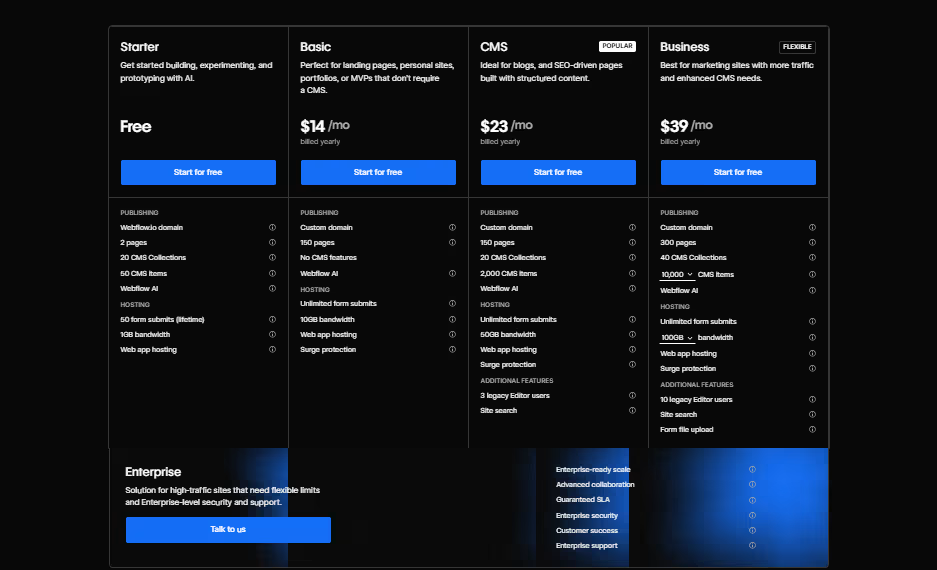
Image Courtesy: Webflow.com
Starter (Free Plan)
- Basic use of the Webflow website builder
- webflow.io domain
- Up to 2 static pages
- Good for learning and early design experiments
Basic Plan – 14 USD/month
- Custom domain connection
- Up to 150 pages
- Fast hosting included
- Great for simple business websites without Webflow CMS
CMS Plan – 23 USD/month
- Everything in Basic
- Fully functional Webflow CMS
- Up to 20 CMS Collections
- Up to 2,000 CMS items
- Ideal for blogs, portfolios, and dynamic content websites
Business Plan – 39 USD/month
- Higher page and CMS limits
- Up to 40 CMS Collections and 10,000 CMS items
- Better performance for high-traffic sites
- Perfect for fast-growing brands
Enterprise Plan – Custom
- Advanced traffic scaling
- Security compliance and SLAs
- Dedicated support
- Built for enterprise-grade websites using no-code website builder workflows
2. E-commerce Plans – These sit on top of CMS or Business Site Plans.
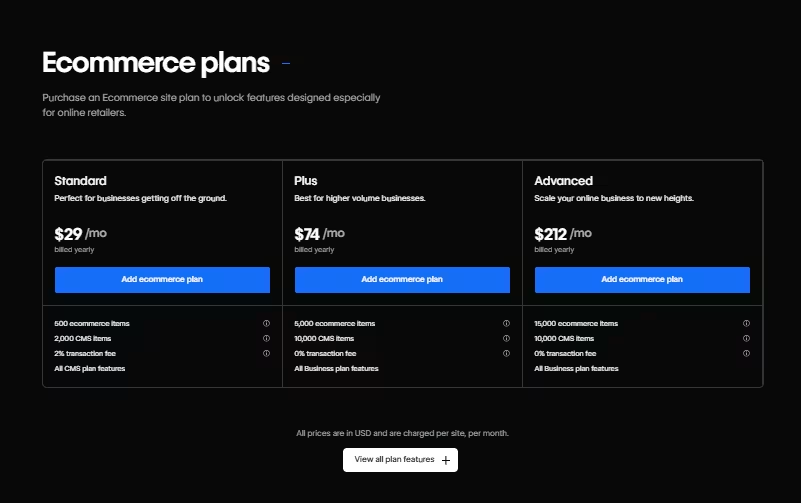
Image Courtesy: Webflow.com
Standard – 29 USD/month
- Up to 500 products
- Basic e-commerce features
- Ideal for small online stores
Plus – 74 USD/month
- Up to 5,000 products
- 0 percent transaction fees
- Good for scaling D2C businesses
Advanced – 212 USD/month
- Up to 15,000 products
- All advanced store features unlocked
- Best for growing online brands with large inventory
3. Workspace Plans for teams
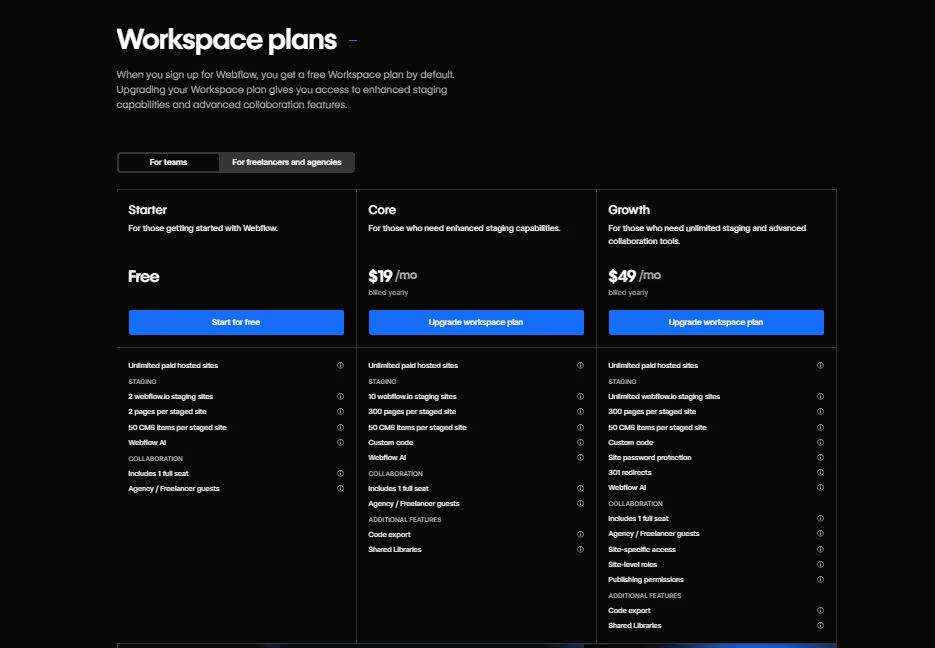
Image Courtesy: Webflow.com
Starter – Free
- One user seat
- Good for solo creators learning Webflow
Core – 19 USD per seat/month
- Collaboration features
- Code export option
- Better staging for agency workflows
Growth – 49 USD per seat/month
- Unlimited staging sites
- Extra tools for bigger teams
- Smooth multi-person builds
Enterprise – Custom
- Team-wide security
- Enterprise collaboration controls
- Admin and permission tools
Who Can Use Webflow?
The Webflow website builder is designed to work for almost anyone involved in creating or managing a website. It gives full visual control while scaling enough to support business websites, agencies, and even enterprise teams. That makes it a true all-in-one website builder for a wide range of users. Here’s who benefits the most:
1. Designers & Creative Agencies
Designers can turn ideas into real websites directly on the canvas, without waiting for developers. Webflow allows them to craft truly custom layouts, animations, and brand experiences while still delivering clean, production-ready results. And with Webflow CMS, client handovers become easier because content teams can update text and media confidently without touching the design.
2. Business Owners & Startups
Founders and business owners can use Webflow to launch their brand presence quickly through no-code web design. The platform removes technical barriers, so they can add new pages, change content, or scale their website anytime. It offers speed during launch and agility as the business grows, without requiring ongoing developer support.
3. Marketers & Content Teams
Marketing teams love Webflow because they can build and update campaigns on their own terms. They can publish blog content using Webflow CMS, optimize pages with built-in SEO tools, and analyze performance inside the platform. That means no delays waiting for developers, and faster turnaround for growth-focused content.
4. Developers & Enterprise Teams
Developers can use Webflow to speed up front-end production while retaining control when needed. They can integrate custom code, APIs, or advanced functionality while Webflow handles hosting, security, and performance. For enterprise teams, this creates a solid digital foundation where design and engineering can collaborate seamlessly.
5. Freelancers & Independent Creators
Freelancers and creators can build high-quality portfolios or client websites visually, without coding knowledge. They can manage projects easily, hand off content editing to clients, and take on more work because the platform removes technical complexity. It is a practical way to deliver premium results while growing a profitable service offering.
Why Are Agencies and Startups Switching to Webflow?
Agencies and startups want speed, flexibility and results. The Webflow website builder helps them achieve that by letting designers build real websites visually through no-code web design, cutting out delays from traditional developer handoffs. Once launched, clients can update content safely using Webflow CMS, which reduces ongoing effort and support.
Startups choose Webflow because they can launch fast without a full engineering team. With built-in hosting, security and performance inside one all-in-one website builder, they do not need plugins or extra platforms just to keep the website running. Real-time collaboration, built-in analytics and new AI capabilities make it easy to scale and stay ahead in a fast-moving market.
In other words, Webflow keeps agencies efficient and helps startups stay agile, which is why more teams are moving to a platform built for modern growth.
Webflow Pros and Cons At Glance
Here is a quick comparison to help you understand where the Webflow website builder excels and where it may not be the perfect fit for everyone.
| Pros | Cons |
| True no-code website builder that outputs clean, production-ready code | Slight learning curve for beginners because of full design control |
| All-in-one website builder with hosting, security, SEO and Webflow CMS built in | Limited scope for advanced backend logic or custom databases beyond CMS limits |
| Full creative freedom with custom layouts and animations | Pricing can feel higher compared to simple template-based builders |
| Built-in SEO tools and high-performance hosting for better search results | Content-heavy migrations require manual setup rather than auto-import |
| Easy collaboration for agencies and content teams | More visual design knowledge needed compared to drag-and-drop only tools |
| Scales well for startups, business websites and branded experiences | Users may need time to master responsive design within the builder |
What does this mean for you?
Webflow gives you top-tier design flexibility and long-term scalability when you want a high-quality, professional online presence through no-code web design. If you only need a very basic site or expect complex backend logic, it might not be the simplest option.
Ready to Build Your Next Website on Webflow?
If you’re done juggling plugins, slow developers, and fragile templates, it’s time for a better system. At Idea Fueled, we use the Webflow website builder to create scalable, design-first websites with built-in hosting, clean code, and a structured Webflow CMS.
Let Idea Fueled build a no-code website that actually grows with your business. Book a free strategy call now.
Conclusion
The way websites are built is changing, and the Webflow website builder is at the front of that shift. By combining visual creativity with clean code output, no-code web design now delivers the same quality that once required a full development team. Webflow bundles everything professionals need into one all-in-one website builder: design, hosting, security, SEO, and Webflow CMS for content-driven pages.
No matter if it is a small startup launching a brand or an established agency delivering high-end client projects, Webflow offers the speed and control that modern web teams expect. It simplifies the process, scales with growing ideas, and reduces technical friction at every step. This is why more businesses are moving their digital presence to Webflow today and preparing for an even more efficient future tomorrow.
Frequently Asked Questions (FAQs)
1. Is Webflow really a no-code website builder?
Yes, Webflow is a true no-code website builder that lets you design and launch professional websites without writing any code. You visually build pages using a drag-and-drop canvas, and Webflow quietly converts your design decisions into clean HTML, CSS, and JavaScript in the background. Designers get full creative control over layouts, styling, and interactions, while the output still meets real development standards.
Because hosting, security, and SEO tools are built into the Webflow website builder, you do not have to worry about technical configurations or plugin issues. It simplifies how teams create digital experiences and makes professional website building accessible to anyone, including marketers and business owners, not just developers. This is why Webflow has become the most trusted platform in modern no-code web design.
2. What types of websites can I build using Webflow?
You can build almost any type of website with the Webflow website builder, including business websites, portfolios, landing pages, and e-commerce stores. Webflow supports both static and dynamic content using Webflow CMS, which makes it perfect for blogs, startup marketing sites, media pages, and collections of content like case studies or product listings.
Its design flexibility allows you to create fully custom layouts and animations without templates holding you back. Since Webflow includes hosting, security, and performance features, you can confidently build websites that scale without switching platforms later. Whether you are a startup trying to launch fast, an agency delivering polished brand experiences, or a creator building a personal portfolio, Webflow gives you everything you need in one all-in-one website builder.
3. Do I need plugins like WordPress when using Webflow?
No, you do not need plugins when using Webflow because it is an all-in-one website builder with hosting, security, SEO settings, performance features, and Webflow CMS all built in. WordPress often requires third-party plugins for basic functionality like forms, security, analytics, and page building, which can increase cost and cause compatibility issues over time.
In Webflow, all essential website features are already integrated into the platform and maintained by Webflow itself. That means fewer updates, fewer errors, and no plugin conflicts slowing down your website. Webflow keeps everything streamlined so you can focus on creating high-quality pages through no-code web design, instead of constantly managing add-ons to keep your site running smoothly.
4. Is Webflow good for SEO?
Yes, Webflow is very good for SEO because it generates clean, semantic code and gives you full control over important search optimization settings. Inside the Webflow website builder, you can set meta tags, alt text, heading structure, custom URLs, and 301 redirects without plugins. Automatic sitemaps, fast hosting, and strong site performance help search engines crawl and rank pages more effectively.
Since Webflow is an all-in-one website builder, you are not relying on external tools for speed or security, which often impact SEO scores on other platforms. Combined with Webflow CMS, marketers can update SEO-focused content quickly, helping websites stay competitive on search engines while supporting long-term organic growth.
5. Can startups and small businesses afford Webflow?
Yes, startups and small businesses can afford the Webflow website builder because pricing is flexible and designed to scale with business needs. There is a free Starter plan for learning and early design experiments, and affordable paid plans when you are ready to publish using your own domain. Since Webflow includes hosting, security, and essential features in one platform, businesses save money by not paying separately for plugins, server costs, or developer maintenance.
With no-code web design, founders and marketing teams can build and update pages themselves, instead of hiring developers for every small change. That makes Webflow a cost-effective, all-in-one website builder that delivers professional results on a startup-friendly budget.
6. Can developers also use Webflow?
Yes, developers can use Webflow and benefit from it because it speeds up front-end production while still supporting advanced functionality. While most of the design happens visually through no-code web design, Webflow allows developers to embed custom code, use APIs, and integrate tools whenever needed. This gives teams a strong technical foundation while Webflow handles hosting, security, and performance automatically.
Developers can focus on complex features instead of spending time on repetitive layout work. And since Webflow CMS and the overall all-in-one website builder setup simplify content delivery, engineering teams can collaborate smoothly with designers and marketers on scalable, production-ready websites.
7. Why do brands prefer Webflow over WordPress or Wix?
Brands prefer the Webflow website builder because it delivers full design freedom, clean code output, and easier content management without relying on plugins. Unlike template-driven tools like Wix, Webflow allows custom layouts that match brand identity perfectly. Compared to WordPress, Webflow includes hosting, security, SEO tools, and Webflow CMS in one platform, reducing ongoing maintenance and technical issues.
This makes Webflow faster to build, easier to manage, and more reliable for long-term performance. With modern features like real-time collaboration and built-in analytics, teams launch websites faster and update them continuously as they scale. This is why many trusted brands choose Webflow to power serious digital experiences.
8. Is Webflow better than Figma?
Webflow is not better than Figma because they serve completely different purposes. Figma is a design and prototyping tool used to plan website layouts and user experiences before development. The Webflow website builder, on the other hand, takes those designs and turns them into real, live websites using no-code web design.
Webflow includes hosting, SEO tools, security, and Webflow CMS, making it an all-in-one website builder for launching production-ready websites. Many teams design in Figma first, then build in Webflow to publish the final experience on the web. So instead of choosing one over the other, the best results come from using both together in a smooth design-to-development workflow.
9. How long does it take to learn Webflow?
It does not take long to learn Webflow because it is a no-code website builder designed for visual learning. Most beginners can understand the basics of the Webflow website builder within a few days, especially with Webflow University tutorials guiding them step-by-step. The platform uses a drag-and-drop canvas, so you are learning by doing instead of memorizing code.
People who already understand design tools like Figma or Canva quickly adapt to building real websites. As users become confident with layout, styling and Webflow CMS, they can start creating complete custom designs. The learning curve depends on how deep you want to go, but the payoff is huge because you can build professional websites without a developer. This is why Webflow has become a fast-adoption choice for agencies, startups and creators.
10. Can I migrate my existing website to Webflow?
Yes, you can migrate an existing website to the Webflow website builder, especially if you want better design control, built-in hosting and cleaner SEO structure. The migration process usually involves rebuilding layouts visually, then importing content into Webflow CMS if your current site uses dynamic data. Many brands move away from plugin-heavy platforms because Webflow removes maintenance issues and gives them a more reliable all-in-one website builder setup.
While Webflow does not automatically convert existing templates or code, it makes the redesign experience faster since you can visually recreate pages without rewriting code. Once migrated, marketers can update content easily, sites load faster and the entire website becomes more scalable. That is why agencies and growing businesses often shift their websites to Webflow when they want a long-term digital foundation.
11. What are Webflow’s limitations?
Webflow has a few limitations, mainly related to complexity in the beginning and the need for visual learning. Since the Webflow website builder gives full design freedom, beginners may feel overwhelmed at first compared to simpler template-based tools. It is not ideal for websites that require advanced backend systems or custom databases beyond what Webflow CMS supports.
For teams coming from WordPress or Wix, migrating large content sets may take planning because Webflow focuses on intentional no-code web design rather than auto-generated layouts. Pricing can also feel higher when compared to basic site builders, but it includes hosting, security and scalable performance inside one all-in-one website builder. These limitations are small compared to the benefits, which is why Webflow is widely used by brands and agencies that value quality and control.
12. Is Webflow good for blogs?
Yes, Webflow is very good for blogs because Webflow CMS is built to handle structured content like articles, categories and authors without plugins. You design your blog layout visually, and every new post automatically follows the same style. The Webflow website builder generates clean code that supports better SEO performance, helping blogs load faster and rank higher. Content teams can publish articles quickly using a simple editor while designers keep full control of brand elements.
Since Webflow includes hosting and security, you do not worry about plugin updates or server issues affecting your blog. It is a smart choice if you want no-code web design with creative freedom, consistent layouts and long-term scalability for content marketing. Many businesses choose Webflow blogs to support SEO and audience growth.
13. Can Webflow replace my developer entirely?
Webflow can replace a front-end developer for most websites, but not a full development team. You can design, launch, and manage professional websites without coding. However, if you need custom backend systems, complex user authentication, or third-party API integrations beyond Webflow’s capabilities, you may still need developer support for those specific features. For 80% of business websites, Webflow eliminates the need for ongoing developer involvement.