


Your website is losing money right now. Not because of poor content or weak backlinks. But because it is slow.
A one-second delay in page load time reduces conversions by 7%. For a business earning $100,000 per month, that single second costs $84,000 annually. That is not a small technical problem. That’s a disaster for your revenue and growth.
In 2026, Google measures your site’s speed through Core Web Vitals, a set of three performance metrics. These metrics directly affect where your site appears in search results. They also determine whether your visitors stay or leave.
This guide explains what Core Web Vitals 2026 are, what changed in March 2026, and exactly how they affect your rankings and revenue.
What Are Core Web Vitals?
Core Web Vitals are three specific metrics Google uses to measure real user experience. They are not lab estimates. They come from Chrome UX Report (CrUX), which collects data from actual Chrome users visiting your pages.

According to Google’s official Search Central documentation, these three metrics represent the most critical aspects of user experience: loading, interactivity, and visual stability.
| Metric | What It Measures | Good Threshold (2026) | Poor Threshold |
| LCP | Time for the largest visible content to load | Under 2.0 seconds | Over 4.0 seconds |
| INP | Time for page to respond to any user interaction | Under 200ms | Over 500ms |
| CLS | How much page elements shift during load | Under 0.1 | Over 0.25 |
Note: LCP threshold tightened from 2.5s to 2.0s in Google’s March 2026 core update.
Source: Google Search Central.
1. Largest Contentful Paint (LCP)
LCP measures how fast your main content loads. Think of it as the moment a user sees your hero image or headline fully appear. Google calls this the user’s first signal that your page is ready.
2. Interaction to Next Paint (INP)
INP replaced First Input Delay (FID) in March 2024. It measures how fast your page responds to every click, tap, or keystroke during a session. FID only measured the first interaction. INP measures all of them. That makes it far stricter.
3. Cumulative Layout Shift (CLS)
CLS measures visual stability. If a button jumps right as someone is about to click it, that is a CLS problem. Unexpected layout shifts destroy trust and increase exit rates.
What Changed in Core Web Vitals 2026?
The March 2026 Google core update brought the most significant changes to Core Web Vitals 2026 since the original 2021 rollout. Two updates matter most for your site right now.
1. LCP Threshold Tightened to 2.0 Seconds
Google lowered the ‘Good’ LCP threshold from 2.5 seconds to 2.0 seconds. Sites with LCP between 2.0s and 2.5s now fall into the ‘Needs Improvement’ zone. According to digitalapplied.com’s March 2026 analysis, sites with LCP above 2.5s saw average ranking drops of 2 to 4 positions on competitive queries.
2. INP Is Now a Primary Ranking Signal
INP moved from a supplementary metric to an equal ranking signal alongside LCP and CLS. Google confirmed this in a Search Central blog post on March 18, 2026. Sites with INP above 200ms in the ‘needs improvement’ range saw measurable position drops averaging 0.8 places.
3. Two New Metrics Join the Framework
Google introduced two additional metrics in 2026. They are not yet primary ranking signals but will influence future scoring.
| New Metric | What It Measures | Status in 2026 |
| Visual Stability Index (VSI) | Layout stability across the entire user session, not just page load | Monitoring signal, not yet a ranking factor |
| Engagement Reliability (ER) | How consistently users can interact with your site without hitting broken elements | Monitoring signal, not yet a ranking factor |
Think of Visual Stability Index (VSI) as CLS’s smarter sibling. CLS looks at page load. VSI looks at your entire visit. Prepare for both now before they become ranking factors.
| “Core Web Vitals in 2026 are no longer just technical benchmarks. They reflect how well your website serves its audience. Sites with poor performance simply do not show up in AI-driven search overviews.” SEOlogist Inc., Core Web Vitals 2026 Update Analysis (January 2026) |
4. Mobile Performance Now Carries More Weight
Google’s mobile-first indexing has always prioritized mobile optimization scores. In 2026, mobile Core Web Vitals carry even more weight in overall rankings. Over 64% of global web traffic comes from mobile devices as of Q3 2025 (Fullestop, 2025). If your desktop scores look great but your mobile scores struggle, your rankings can and will still suffer.
How Core Web Vitals Affect Google Rankings?
Core Web Vitals are a confirmed website performance SEO ranking signal. They are not the only factor. Content quality, backlinks, and E-E-A-T still matter more. But CWV acts as a critical tiebreaker in competitive searches.
Here is how the logic works in practice. Two pages have similar content quality and domain authority. One loads in 1.8 seconds. The other loads in 3.2 seconds. Google will almost always rank the faster page higher.
| Only 47-53% of sites globally pass all three CWV thresholds in 2026. Source: HTTP Archive Web Almanac data cited across multiple 2025-2026 SEO analyses. Nearly half of all websites are failing Google’s performance standards right now. |
Pages with good Core Web Vitals 2026 scores also gain visibility in AI Overviews. According to CD Studio’s December 2025 analysis, sites with poor performance rarely appear in AI-generated search responses. As AI Overviews take up more SERP real estate, slow sites lose both organic and AI-cited traffic.
Does Page Speed Affect SEO?
Yes, page speed does affect SEO . But here is the precise answer.
Page speed alone does not guarantee rankings. A fast site with thin content will not outrank a slow site with authoritative, relevant content. But when content quality is comparable, website performance SEO becomes the deciding factor. Google uses a 28-day rolling window of real-user field data from Chrome UX Report (CrUX) to evaluate your scores. That means improvements take roughly four to six weeks to show in Search Console.
So, does page speed affect SEO? Yes, especially in 2026. After the March core update, sites with poor LCP (above 2.5s) or poor INP (above 200ms) saw ranking drops of 0.8 to 4 positions on competitive queries. Page speed is a confirmed ranking signal that functions as a tiebreaker at similar content quality levels. |
The Revenue Impact of Slow Website Performance
Rankings matter. But the revenue argument for Core Web Vitals 2026 optimization is even stronger. Here is the data.
| Performance Fact | Source |
| 1-second LCP delay reduces conversions by 7%, costing a $100K/month site $84,000 per year | Google / Deloitte research via Magnet.co |
| 53% of mobile users abandon a site that takes more than 3 seconds to load | Google / Think with Google |
| Pages loading under 2 seconds have a 9% bounce rate vs. 38% for pages taking 5+ seconds | Multiple studies cited in Google’s web.dev performance documentation |
| E-commerce sites reaching ‘Good’ CWV thresholds report 15-30% conversion rate improvements | Google web.dev case studies (Rakuten, Vodafone, Ray-Ban) |
| Sites with comprehensive CWV optimization see 12-20% organic traffic increases | ALM Corp CWV 2026 Technical Guide, February 2026 |
Real Mini Case Studies: What the Data Shows
These are verified results from Google’s official web.dev case studies.
- Rakuten 24 ran an A/B test and found that good LCP scores led to a 53.37% increase in revenue per visitor and a 33.13% increase in conversion rate. The only variable was CWV optimization.
- Vodafone Italy improved LCP by 31% and saw 8% more sales. The fix involved server-side rendering and reducing render-blocking JavaScript.
- RedBus improved Interaction to Next Paint (INP) and achieved a 7% increase in sales, demonstrating the direct impact of responsiveness on revenue.
- Ray-Ban used the Speculation Rules API to prerender key pages. Mobile conversion rates on product pages increased by 101.47%.
| “When you optimize Core Web Vitals properly, you are not just improving a number on a dashboard. You are compounding gains. Better rankings bring more traffic. More traffic at better conversion rates means more revenue. More revenue funds further improvement.” Magnet.co, Understanding Google’s Core Web Vitals (2025) |
How to Check Your Core Web Vitals Scores?
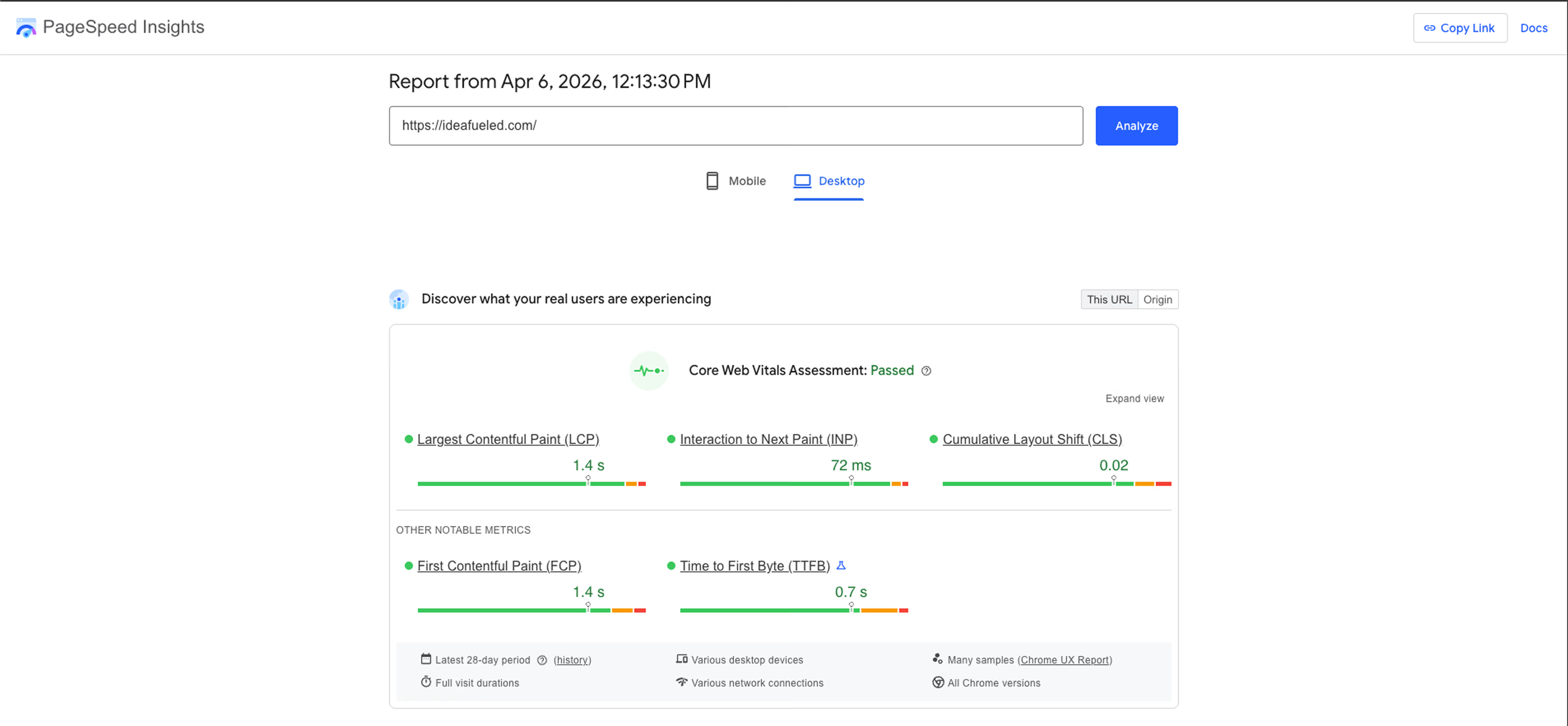
Four tools give you accurate Core Web Vitals 2026 data. Each serves a different purpose.
| Tool | What It Shows | Best Used For |
| Google Search Console | Field data (real users) across your entire site | Monitoring and identifying pages that need fixes |
| PageSpeed Insights | Both lab data (Lighthouse) and field data (CrUX) per URL | Diagnosing individual page issues |
| Google Lighthouse | Controlled lab measurements for debugging | Developer testing before deployment |
| Chrome UX Report (CrUX) | Historical real-user performance data across millions of sites | Benchmarking against industry and competitors |
Start with Google Search Console. It shows your site’s Core Web Vitals report grouped by ‘Good,’ ‘Needs Improvement,’ and ‘Poor.’ Fix the ‘Poor’ pages first. Those carry the highest ranking risk. Use PageSpeed Insights to understand what specifically is causing each failing score.
How to Improve LCP, INP, and CLS?
Fixing LCP (Target: Under 2.0 Seconds in 2026)
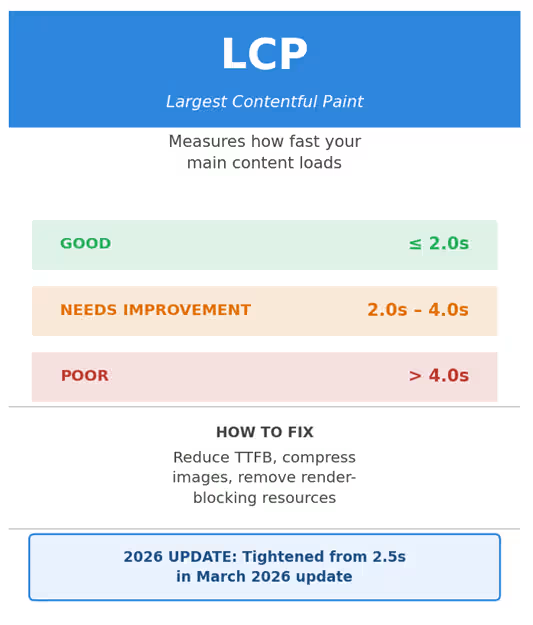
LCP failures usually come from three sources. Here is what to fix.
- Reduce Time to First Byte (TTFB) to under 200ms. Use edge computing (Cloudflare Workers, Vercel Edge) to serve content from locations closest to your users. This reduces latency by 40-70%. (Source: ALM Corp, 2026)
- Eliminate render-blocking resources. Defer non-critical JavaScript and CSS. Use Google’s Lighthouse audit to identify exactly which files are blocking your LCP element.
- Implement lazy loading for below-the-fold images. But do not lazy-load your LCP image. That is one of the most common LCP mistakes in 2026.
- Convert hero images to WebP format. WebP files are 25-35% smaller than JPEGs with no visible quality difference.
Fixing INP (Target: Under 200ms)

- Break up long JavaScript tasks. Any task blocking the main thread for more than 50ms will push your INP into ‘poor’ territory.
- Defer third-party scripts. Chat widgets, analytics tools, and ad scripts are among the most common INP killers.
- Use the Chrome UX Report (CrUX) to identify which pages have the worst real-user INP. Lab tools like Lighthouse do not always surface INP issues accurately.
Fixing CLS (Target: Under 0.1)

- Reserve space for ads and embedded content. Set explicit width and height attributes on every image and video. This prevents layout shifts during load.
- Avoid inserting content above existing content after the page loads. Cookie banners and newsletter pop-ins above the fold are frequent CLS offenders.
The Impact of Core Web Vitals on Businesses
Core Web Vitals directly influence how users experience your website, shaping everything from first impressions to final conversions. Even small improvements in these metrics can drive measurable gains in engagement, trust, and overall business impact.
| Metric | If Poor: Business Impact | If Good: Business Gain | Fix Priority |
| LCP | High bounce rate, lost first impressions, ranking drops | 28-61% conversion rate improvement (Rakuten, Nykaa) | Critical |
| INP | Abandoned forms, poor engagement, 0.8-4 position ranking drop | 7% sales increase (redBus INP case study) | Critical |
| CLS | User mis-clicks, trust erosion, higher exit rates | 10% more ad revenue (iCook), 98% reduction in poor pages (Yahoo Japan) | High |
Core Web Vitals Alone Won’t Save You: The Full Picture
Core Web Vitals sit inside a broader framework Google calls the page experience update. This framework includes HTTPS security, mobile usability, and the absence of intrusive interstitials. All of these signals work together.
Here is the important nuance. Excellent Core Web Vitals will not rescue thin content. And poor Core Web Vitals will hold back excellent content. The relationship between website performance SEO and content quality is not ‘either-or.’ It is ‘both-and.’
The bounce rate and conversion rate optimization (CRO) outcomes that follow good CWV scores are the real business proof. When users stay longer, click more, and convert at higher rates, Google notices. Those behavioral signals reinforce your rankings further.
Conclusion: What to Do Next
The March 2026 core update and trends raised the bar. If your site has not been audited against the new LCP threshold of 2.0 seconds, start there. If your INP scores exceed 200ms, that is now a primary ranking risk. Run these four checks this week:
- Open Google Search Console and check your Core Web Vitals report. Identify ‘Poor’ pages.
- Run your top five pages through PageSpeed Insights. Look at both lab and field data.
- Check your Time to First Byte (TTFB). Anything above 200ms points to a server or hosting issue.
- Use Chrome DevTools to find render-blocking resources and long JavaScript tasks above 50ms.
The sites that treat Core Web Vitals 2026 as an ongoing practice, not a one-time fix, are the ones that maintain strong search visibility. Performance optimization is not a cost center. It is a revenue strategy.
Frequently Asked Question (FAQs)
1. What are Core Web Vitals in 2026?
Core Web Vitals are three metrics Google uses to measure real user experience on your website. They are Largest Contentful Paint (LCP), which measures loading speed; Interaction to Next Paint (INP), which measures responsiveness; and Cumulative Layout Shift (CLS), which measures visual stability. In 2026, Google tightened the LCP threshold to 2.0 seconds and made INP a primary ranking signal.
2. Do Core Web Vitals directly affect Google rankings?
Yes. Core Web Vitals are a confirmed Google ranking signal. They act as a tiebreaker when two pages have similar content quality and authority. After the March 2026 core update, sites with poor LCP or INP scores saw ranking drops of 0.8 to 4 positions on competitive queries.
3. What is a good Core Web Vitals score in 2026?
Google considers these thresholds “Good” in 2026. LCP should be under 2.0 seconds. INP should be under 200 milliseconds. CLS should be under 0.1. These are measured using real user data from the Chrome UX Report, not lab simulations.
4. How long does it take for Core Web Vitals improvements to show in rankings?
Google uses a 28-day rolling window of real-user field data from Chrome UX Report (CrUX) to evaluate Core Web Vitals scores. This means improvements you make today will typically reflect in Google Search Console and rankings within four to six weeks.
5. Does page speed affect SEO even if my content is strong?
Yes, but with an important nuance. Strong content still outranks fast but thin pages. However, when content quality is comparable between two pages, website performance SEO becomes the deciding factor. Poor Core Web Vitals scores will hold back even excellent content in competitive search results.
6. How do I check my Core Web Vitals scores for free?
You can check your scores using four free Google tools. Google Search Console shows field data across your entire site. PageSpeed Insights shows both lab and real-user data per URL. Google Lighthouse runs controlled audits in your browser. Chrome UX Report provides historical real-user data for benchmarking against competitors.