

Most WordPress sites get hacked not because they are targeted by hackers. It is because they are simply easy to hack. So, is your website easy to hack?
WordPress powers 43% of all websites on the internet? That scale makes it the most targeted CMS for cyberattacks globally. Hackers do not pick victims based on business size. They use automated tools that scan thousands of sites per minute, looking for one unpatched plugin or a weak admin password.
The good news is that most WordPress attacks are absolutely preventable. The sites that get hacked are almost always the ones that skipped the basics.
This blog walks you through nine proven WordPress security practices that any site owner can implement, whether you manage your site yourself or work with a developer. By the end, you will have a clear, actionable checklist to protect your site before a breach happens, not after.
Why Do Most WordPress Websites Get Hacked?
Understanding the root cause of attacks is the first step toward prevention. Most hacked WordPress sites were not targeted individually. They were caught in wide, automated net attacks designed to exploit common vulnerabilities at scale.
According to a 2026 Patchstack security report, 11,334 new vulnerabilities were identified in the WordPress ecosystem in 2025 to 2026 alone. That is a 42% increase over 2024, and attackers are now exploiting newly disclosed vulnerabilities within a median window of just five hours.
Here is what typically enables those attacks:
- Outdated plugins and themes: 96% of WordPress vulnerabilities come from plugins, not WordPress core itself.
- Weak login credentials: Brute force attacks remain one of the most common entry points, especially when default usernames like ‘admin’ are in use.
- No web application firewall: Without a WAF, malicious traffic hits your site unchecked.
- Poor hosting environments: Sites on insecure shared hosting face significantly higher risk.
- No monitoring or malware scanning: Many site owners only discover a breach days or weeks after it happens.
The pattern is consistent across security reports: sites that follow basic wordpress security best practices are dramatically less likely to be compromised. The following checklist covers exactly what those practices look like.
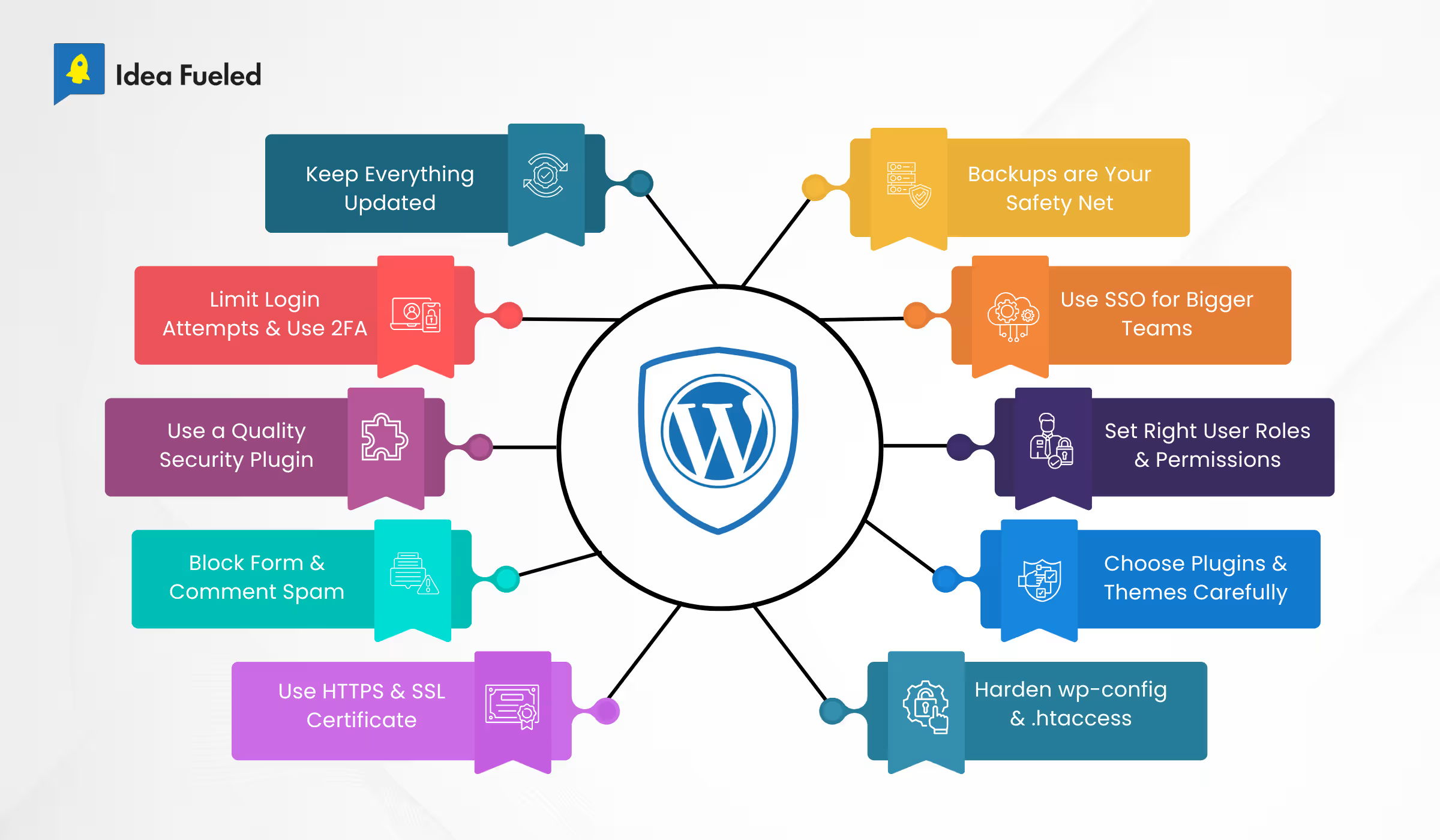
WordPress Security Checklist: 9 Essential Practices
1. Keep WordPress Core, Themes, and Plugins Updated
Outdated software is the single most common entry point for WordPress attacks. When a vulnerability is publicly disclosed, patches are usually released within hours. But if you have not updated, your site remains exposed long after the fix is available.
Enable automatic updates for minor WordPress core releases. For plugins and themes, review updates weekly or use a managed update service. Deactivate and delete any plugins you are not actively using. An unused plugin with a known vulnerability is just as dangerous as an active one.
A practical example: In 2024, a vulnerability in a widely used form builder plugin affected over 600,000 WordPress sites. Most of the compromised sites had simply not applied the available patch. A weekly update routine would have closed that window entirely.
This is one of the most effective wordpress security tips you can act on today without any technical expertise.
2. Use Strong Login Security (Passwords + 2FA)
Your login page is the most attacked area of any WordPress site. Brute force bots cycle through thousands of password combinations per minute. A weak password or a default ‘admin’ username makes this trivially easy.
Start with the basics: use a unique, complex password for every user account on your site. Move away from the default ‘admin’ username during setup or as soon as possible after going live. Then add two-factor authentication (2FA) for all admin-level users.
2FA adds a second verification step, usually a time-based code from an authenticator app, that stops unauthorized access even if a password is compromised. Plugins like WP 2FA or Google Authenticator make setup straightforward.
Also consider limiting login attempts. After three to five failed tries, lock the IP temporarily. This breaks automated brute force attempts before they gain traction.
3. Install a Reliable WordPress Security Plugin
A dedicated wordpress security plugin acts as a continuous monitoring layer for your site. It runs malware scans, watches for file changes, blocks suspicious traffic, and alerts you to threats in real time.
The most widely used options include Wordfence, Sucuri Security, and Solid Security. Each offers a free version that covers the fundamentals. For business-critical sites, the premium tiers provide real-time threat feeds, virtual patching, and post-hack cleanup support.
When choosing a plugin, prioritize those with active development, frequent vulnerability database updates, and a strong support record. A security plugin that has not been updated in six months is itself a potential vulnerability.
See the comparison table later in this post for a side-by-side breakdown of the top options.
4. Set Up a Web Application Firewall (WAF)
A Web Application Firewall (WAF) sits between your website and incoming traffic. It filters out malicious requests, bot traffic, and known attack patterns before they reach your site’s files or database.
There are two types to consider. A DNS-level WAF (like Cloudflare) routes all traffic through its network before it reaches your server. This is the most effective option for blocking large-scale attacks. A plugin-level WAF (like the one built into Wordfence) filters traffic at the WordPress application level, which is still highly effective for most sites.
For growing businesses, a DNS-level WAF is worth the investment. Cloudflare’s free plan provides solid baseline protection. For high-traffic or ecommerce sites, a paid plan with advanced threat intelligence is a better fit.
Pairing a WAF with a security plugin gives your site two distinct layers of defense, which is a core principle of any robust wordpress security strategy.
5. Use SSL (HTTPS) Across Your Entire Website
SSL encrypts the connection between your site and its visitors. Without it, data transmitted through forms, checkouts, and login pages is vulnerable to interception. With it, your users see the padlock icon in the browser and know the connection is secure.
Most quality hosting providers include free SSL certificates through Let’s Encrypt. If yours does not, you can obtain one separately and configure it via your hosting control panel. Once installed, ensure your entire site forces HTTPS by updating your WordPress address settings and using a plugin like Really Simple SSL to handle redirects.
SSL is also a confirmed Google ranking signal. Running on HTTP in 2025 not only puts your users at risk but also hurts your search visibility.
6. Secure Your Hosting Environment
Research shows that sites on secure hosting platforms face up to 50% fewer hacking attempts than those on cheaper, low-security alternatives. Your hosting environment is the foundation your entire site sits on. A weak foundation undermines everything else.
When evaluating hosting for security, look for these features: server-level firewalls, automatic malware scanning, isolated account environments on shared hosting, regular server-side backups, and support for PHP 8.x or later.
Managed WordPress hosts like WP Engine, Kinsta, or Flywheel are built specifically for WordPress and include server-hardening configurations out of the box. If you are on shared hosting with a provider that does not prioritize security, moving to a managed host is one of the highest-impact changes you can make.
If your WordPress site recently went through a redesign or migration, this is a good moment to reassess your hosting setup as well.
7. Schedule Regular Backups
Backups will not prevent a hack. But they will determine whether you can recover from one cleanly or spend days trying to rebuild from scratch.
Your backup strategy should cover three things: frequency, storage location, and recovery testing. Back up your full site (database and files) at least once a day for active sites. Store backups off-site, either in cloud storage like Google Drive, Dropbox, or Amazon S3, never only on the same server as your site.
Test your backups periodically by restoring to a staging environment. A backup that cannot be restored is not a backup. Plugins like UpdraftPlus, BlogVault, and Solid Backups automate this process and provide reliable offsite storage options.
For agencies and businesses managing multiple client sites, a centralized backup solution saves significant time and reduces the risk of one missed backup creating a major problem.
8. Limit User Access and Permissions
Not every user on your site needs administrator access. WordPress offers five default roles: Administrator, Editor, Author, Contributor, and Subscriber. Each has a distinct set of permissions. Assigning the right role to each user reduces the damage an attacker can do if that account is ever compromised.
Audit your user list regularly. Remove accounts for team members who no longer work with you. If you are working with a developer or agency, create a temporary admin account for the duration of the project and delete it when the work is complete.
According to Patchstack’s mid-year 2025 vulnerability report, 20.6% of vulnerabilities require only a low-privilege Contributor login to exploit. Tightening permissions and removing unnecessary accounts directly reduces that attack surface.
9. Monitor Your Website for Malware and Suspicious Activity
Many compromised sites go undetected for weeks. Hackers are not always trying to bring your site down. Often they are quietly using your site to send spam, redirect traffic, inject SEO spam, or host phishing pages. None of this is visible on the surface.
Set up active monitoring using your security plugin’s scanning feature. Schedule daily or weekly full-site scans. Configure email alerts for any file changes, new user registrations, or failed login spikes. Install an activity log plugin like WP Activity Log to maintain a clear record of every action taken on your site.
If you use Google Search Console, check it regularly for manual actions or unusual crawl patterns. These are often early signals that something is wrong before any visible symptom appears.
Proactive monitoring is what turns a potential disaster into a minor incident.
| Real-World Case Study: The VexTrio / DollyWay Attack (2025) In March 2025, GoDaddy’s security team published findings on a campaign called DollyWay World Domination, operated by VexTrio, one of the largest known cybercriminal affiliate networks. The campaign had been running for eight years and had silently compromised over 20,000 WordPress websites worldwide. How the attack worked: Attackers injected malicious JavaScript into WordPress sites by exploiting vulnerabilities in outdated plugins and themes. The malware silently redirected real visitors through a Traffic Direction System (TDS), routing them to scam pages for cryptocurrency fraud and dating schemes, but only when they actively clicked, bypassing passive security scans entirely. The malware reinfected the site on every page load, disabling security plugins and hiding its own admin accounts in the database so they were invisible in the WordPress dashboard. As of early 2025, the operation was generating around 10 million monthly impressions across infected sites, all while those site owners continued operating with no visible signs of compromise. What prevented detection for so long: Affected sites had no active malware monitoring, no file integrity alerts, and no WAF to flag the injected scripts. Many were on shared hosting without server-level scanning. The sites looked and functioned completely normally to their owners. What would have stopped it: A security plugin with active file change detection would have flagged the injected scripts immediately. Regular plugin updates would have closed the initial vulnerability. A WAF would have blocked the malicious TDS traffic at the network level. Any one of these three practices, applied consistently, would have broken the attack chain. Source:Dark Reading, March 2025 , and TechRadar Pro, 2025 |
Best WordPress Security Tools
| Tool | Pricing | Key Features | Best For |
| Wordfence | Free + Premium | Firewall, malware scan, login security | Best for: Most WordPress sites |
| Sucuri Security | Free + Paid | Malware scanning, WAF, post-hack cleanup | Best for: Sites needing cleanup + protection |
| iThemes Security | Free + Pro | Login limits, 2FA, file change detection | Best for: Beginners |
| Solid Security (iThemes) | Free + Pro | Brute force protection, virtual patching | Best for: Dev-managed sites |
| Cloudflare | Free + Paid | CDN + WAF, DDoS protection | Best for: High-traffic sites |
Note: Pricing and features may change. Always check the plugin’s official page for the latest details.
Ready to Secure Your WordPress Site?
Most WordPress sites get hacked not because of sophisticated attacks, but because of skipped basics. The nine practices above are not complex. They are consistent. And consistency is what keeps your site, your data, and your clients’ trust intact.
At Idea Fueled, we help growth-stage businesses and SaaS brands build websites that are not just well-designed but well-protected. Whether you need a security audit, a site migration, or a full content and technical strategy, we are ready to help.
Get a free WordPress security consultation. Talk to the Idea Fueled team today.
Conclusion
WordPress security practices are not a one-time setup. They are an ongoing habit. Keeping software updated, using strong login controls, running regular backups, and monitoring for threats are the four pillars that hold everything else together.
Start with whatever you have not done yet. Even implementing two or three of these practices today puts your site in a significantly stronger position than the majority of WordPress sites currently running on the web.
Security is not about being unhackable. It is about making your site a harder target than the one next to it.
Frequently Asked Questions (FAQs)
1. What are the most important WordPress security practices for beginners?
Start with three: keep everything updated (core, themes, plugins), use a strong password and 2FA on your admin account, and install a reputable security plugin like Wordfence. These three steps address the most common attack vectors and take less than an hour to set up.
2. How do I know if my WordPress site has been hacked?
Warning signs include: unfamiliar admin users, unexpected redirects, slow site performance, your hosting provider flagging malware, or alerts in Google Search Console. Run a malware scan using your security plugin immediately if you notice any of these.
3. Is a free WordPress security plugin enough?
For many sites, yes. Free versions of Wordfence and Sucuri provide solid baseline protection including firewall rules, malware scanning, and login security. Premium versions add real-time threat intelligence, virtual patching, and priority support, which are worth considering for business-critical sites.
4. How often should I back up my WordPress site?
Daily backups are the standard for active sites. If your site has high transaction volume or frequent content updates, consider real-time or twice-daily backups. Always store backups offsite and test restoration at least once a quarter.
5. Does SSL protect my WordPress site from hackers?
SSL encrypts data in transit, which protects your users’ information from being intercepted. It does not protect your site’s files or database from being accessed directly. SSL is an essential layer of wordpress security but should be combined with the other practices in this guide for full protection.
6. What is the difference between a WAF and a security plugin?
A WAF (Web Application Firewall) filters malicious traffic before it reaches your server or application. A security plugin works at the WordPress level to scan files, detect threats, and block bad actors within your site. Both play different roles, and the most secure sites use both in combination.