

Most SaaS companies do not outgrow their product. They outgrow their CMS. A traditional CMS handles a marketing blog fine. It struggles with a product that serves content across web apps, mobile, docs, and email.
According to WP Engine‘s State of Headless 2024 report, surveyed across 1,015 CTOs, CMOs, and IT decision-makers, 73% of businesses now use headless architecture, up nearly 40% from 2019. The question is no longer whether headless works. It is whether it works for your SaaS.
This guide breaks down the differences between headless CMS and traditional CMS. It covers scalability, SEO, developer experience, and real-world outcomes. By the end, you will know which architecture fits your growth stage.
What Is the Difference Between Headless and Traditional CMS?
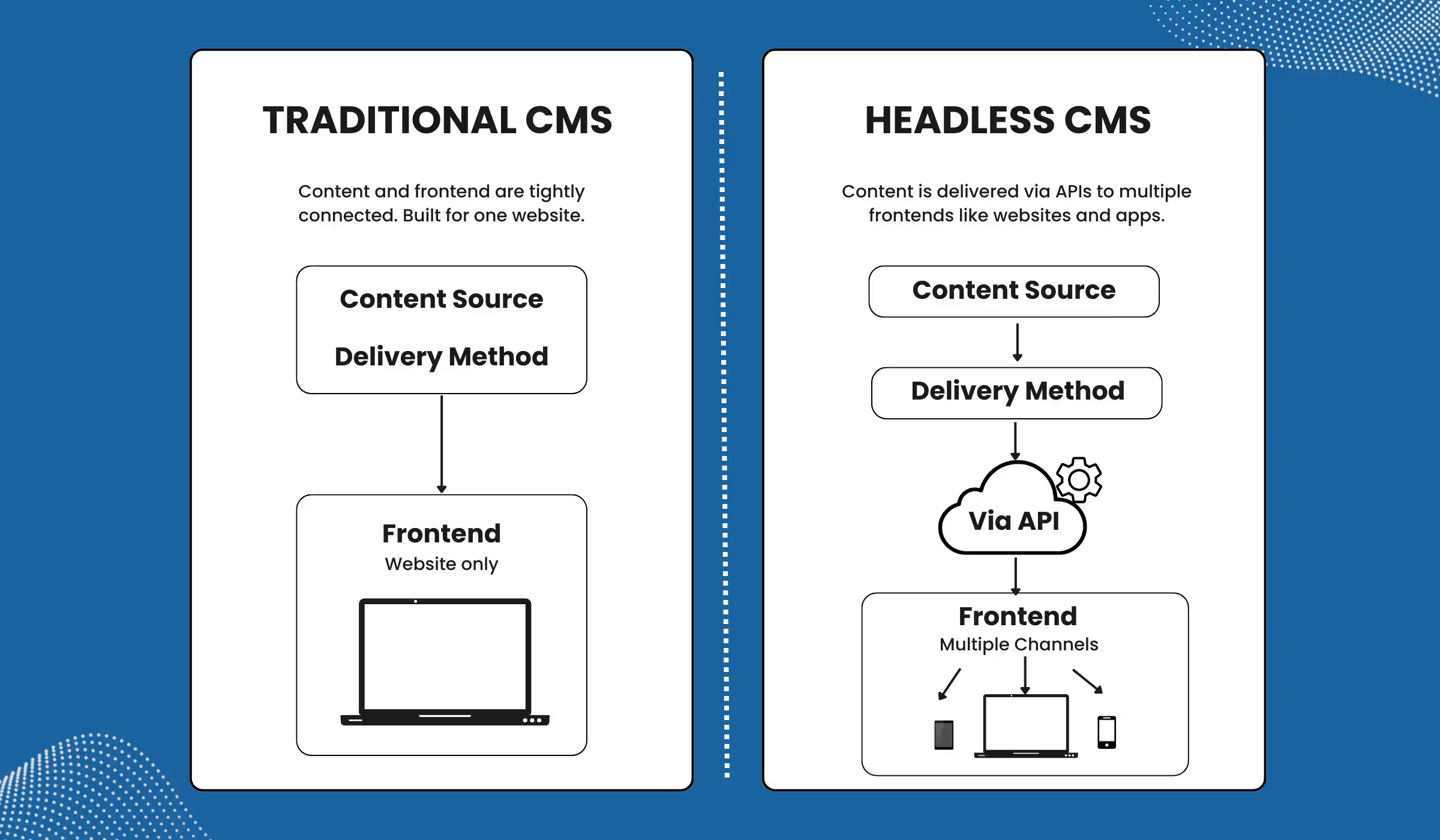
A traditional CMS couples the content backend with the frontend presentation. A headless CMS separates them. Content is stored in the backend and delivered via API to any frontend, app, or channel.
With a traditional CMS like WordPress or Drupal, the backend and frontend live in one system. A developer edits a template. The CMS renders the page. Simple, fast to set up, and limited in flexibility.
With a headless CMS like Contentful, Sanity, or Storyblok, the CMS only manages content. A separate frontend, built in React or Next.js, fetches that content via API. The CMS does not care where the content goes. It can go to a web app, a mobile app, an in-app tooltip, or an email.
| Feature | Traditional CMS | Headless CMS |
| Architecture | Coupled frontend + backend | Decoupled, API-first |
| Content delivery | Pages only | Any channel or surface |
| Developer flexibility | Limited by templates | Full frontend freedom |
| Scalability | Moderate | High |
| Setup speed | Fast | Medium to high effort |
| Best for | Blogs, content sites | SaaS, omnichannel products |
Why SaaS Companies Outgrow Traditional CMS Faster?
A SaaS product does not live in one place. It runs a marketing site, an in-app help center, a changelog, a docs portal, and email campaigns. A traditional CMS manages one surface. It was not designed for the rest.
When a SaaS team adds a second product, a new market, or a new language, they hit the ceiling fast. Developers get blocked waiting for template changes. Marketers cannot push content independently. Plugin stacks grow bloated and slow.
Here is what scalable CMS for SaaS products actually demands:
- Multi-surface delivery: content must reach the web, mobile, and in-app from one source.
- API-native integration: content must connect to analytics, CRM, and product tools.
- Structured content models: content must follow product logic, not page templates.
- Independent publishing: marketers must push updates without developer dependencies.
Traditional CMS platforms cannot handle all four at once. Not without serious workarounds, and workarounds do not scale.
Does Headless CMS Scale Better for SaaS?
Yes, with the right setup. Here is why.
An API-first CMS for fast growth treats content as infrastructure. A single content entry can populate a web page, a mobile screen, a product tooltip, and a help doc, all from one source. That is a content model built for scale.
Headless platforms serve content via CDN. A SaaS company with 100,000 users hitting docs during an incident does not want their CMS server under load. CDN delivery removes that risk entirely.
| “Headless is no longer an emerging technology. It is a mainstay that organizations will need to fully embrace to maintain a competitive advantage and manage digital change effectively.” Ramadass Prabhakar, Chief Technology Officer, WP Engine |
Case Study: K2 Sports (Elevate Outdoor Collective)
K2 Sports, operating under Elevate Outdoor Collective, ran multiple brands on a monolithic platform. Each content update required developer involvement. Publishing was slow and expensive.
After migrating to Contentstack, a headless CMS, the team launched 8 brand sites in under 9 months. Nicole Fugere, Director of Web Services at Elevate Outdoor Collective, noted:
“Updating content has gotten 90% faster. Contentstack allowed us to launch eight websites in less than six months.”
Result: Sites were created 75% faster. Productivity increased 50%. Developers moved off content updates and into product work.
Is Headless CMS Better for SEO?

This is where the headless CMS vs traditional CMS debate gets nuanced. The honest answer: headless CMS is better for SEO when built correctly, and harmful when built poorly.
A headless setup paired with Next.js or Nuxt delivers full control over Core Web Vitals. Developers set meta tags programmatically. Structured data goes in cleanly. Pages load from a CDN edge. These are real SEO advantages.
Built poorly, headless causes problems. A React app without server-side rendering gives search engines nothing to crawl. Missing sitemaps and lazy-loaded content hurt indexation. Headless is not a shortcut to better SEO.
| Aspects | Headless CMS (done right) | Headless CMS (done wrong) |
| Core Web Vitals | Fast (CDN delivery) | Slow (unoptimized SSR) |
| Meta control | Full programmatic control | Inconsistent or missing |
| Structured data | Clean, developer-managed | Often skipped |
| Crawlability | High with SSR/SSG | Low without SSR |
| SEO outcome | Strong | Poor |
For SaaS companies, a headless CMS with a modern framework is the strongest SEO stack available today. The SEO is not automatic. It requires a team that knows how to build it right.
Headless CMS vs WordPress for SaaS
According to the W3Techs, 2025 report, WordPress powers 43.5% of all websites . It dominates because it is cheap, fast to set up, and well-understood. For a SaaS company in its first year, WordPress works fine as a blog and marketing site.
The problem starts at scale. WordPress was built for publishing. A SaaS product ecosystem involves a marketing site, product docs, in-app content, email campaigns, and partner portals. WordPress was not designed to handle all of those from one system.
Case Study: Emarsys
Emarsys, a B2B SaaS company, ran their corporate site on WordPress. Content updates required developer involvement. Design changes took too long to ship. The team needed something faster and more flexible.
They migrated to Storyblok, a headless CMS. The new brand site, including full content migration, went live in 3 weeks. Developers, designers, and content editors all onboarded quickly. The atomic design system made future updates faster and more consistent.
The best headless CMS for B2B SaaS depends on your team size and content complexity. Contentful suits enterprise-scale content operations. Sanity suits teams that need real-time collaboration and custom content models. Storyblok suits teams that want a visual editor alongside headless flexibility. Strapi suits teams that want a self-hosted, open-source option.
Which CMS Is Right for Your SaaS?
The honest answer: it depends on where you are in your growth. Use these three questions to find out.
- Are you managing content across more than one surface? If your content needs to reach a web app, mobile app, docs portal, or email, headless is the better choice.
- Does your dev team have bandwidth for a headless frontend? Headless requires a custom frontend. If that resource is not available, it becomes a liability.
- Are you planning 10x growth in the next 18 months? If yes, build for scale now. Migrating later costs more and takes longer.
If two or more answers are yes, a headless CMS is likely the right move. If none apply, a well-configured WordPress site handles early-stage SaaS content needs effectively.
One important note: Headless is not plug-and-play. It requires a clear content model, a capable frontend team, and a migration plan. The upfront investment is real. So is the payoff.
When NOT to Use Headless CMS?
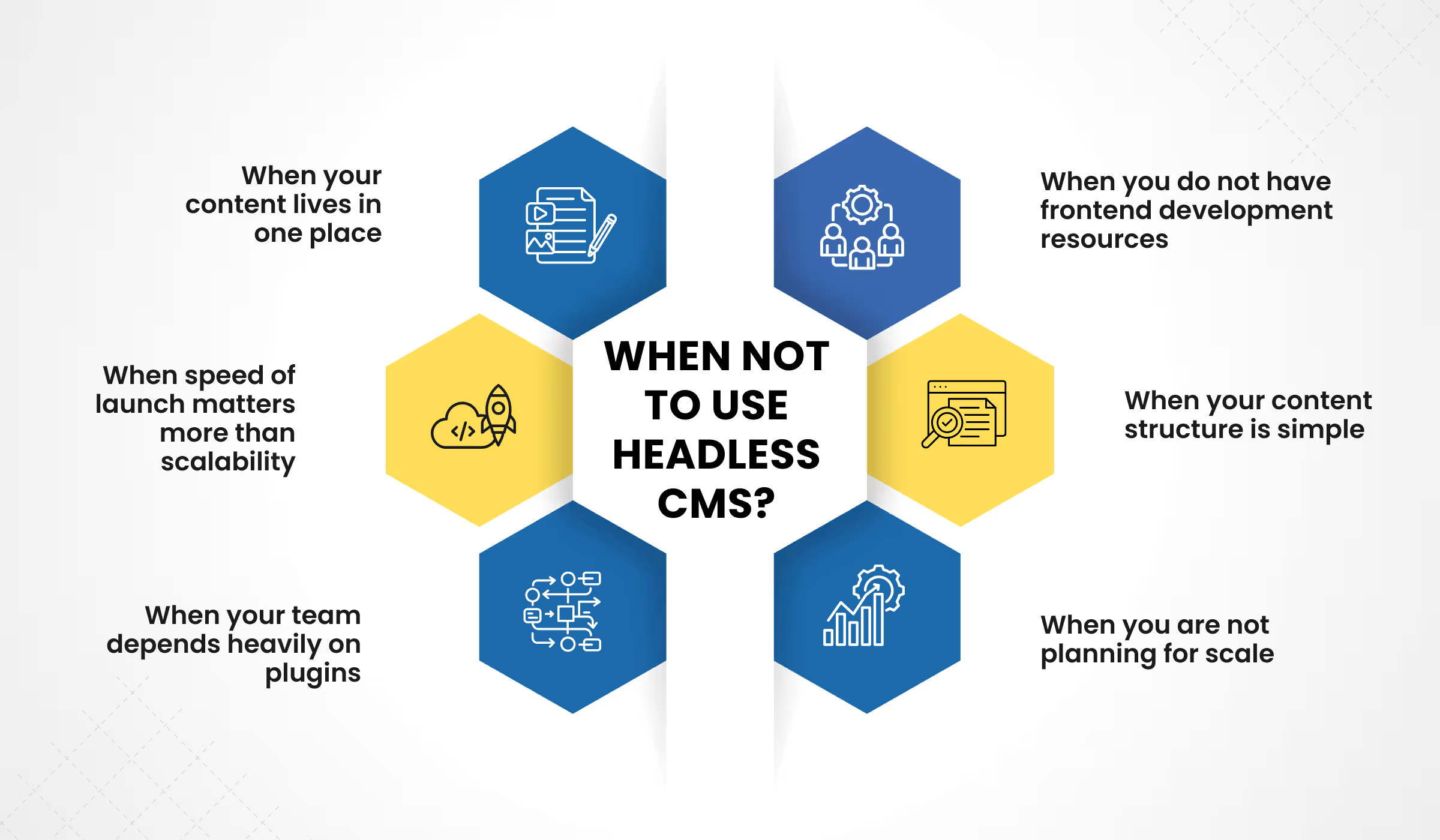
Headless CMS is powerful. But it is not the right choice for every SaaS company. In some cases, it adds complexity without delivering real value. Here is when not to use headless CMS and when a traditional CMS is the better decision.
1. When your content lives in one place
If your SaaS only runs a marketing website or blog, a traditional CMS like WordPress is enough. Headless becomes valuable when content needs to flow across multiple surfaces like apps, docs, and in-product experiences. Without that complexity, headless is unnecessary overhead.
2. When you do not have frontend development resources
A headless CMS requires a custom frontend, often built using frameworks like React or Next.js. If your team does not have the bandwidth or expertise to build and maintain this, headless quickly becomes a bottleneck instead of an advantage.
3. When speed of launch matters more than scalability
Traditional CMS platforms are faster to set up. If you need to launch quickly, validate a product, or test messaging, a coupled CMS helps you move faster. Headless requires planning, architecture, and development time upfront.
4. When your content structure is simple
Headless CMS works best with structured, reusable content models. If your content is mostly static pages with minimal reuse, the benefits of an API-first CMS for fast growth do not apply.
5. When your team depends heavily on plugins
Traditional CMS platforms offer ready-to-use plugins for SEO, forms, analytics, and more. In a headless setup, many of these features need to be built or integrated manually, increasing effort and cost.
6. When you are not planning for scale
Headless CMS is built for scale. If your SaaS is not expanding into multiple products, markets, or channels, the investment may not justify the outcome.
Conclusion
Headless CMS scales better for SaaS. That is the direct answer. It delivers content across every surface from one source, performs well under load, and gives development teams the freedom to build without CMS constraints.
But architecture alone does not build a growth-ready content system. The platform, the content model, and the team all have to be right. Getting that right from the start saves months of painful migration work later.
| At Idea Fueled, we help SaaS companies navigate exactly this decision. From CMS architecture to full content strategy, we audit your current stack and give you a clear direction. So, if not sure which CMS fits your growth stage? Let’s talk. We’ll audit your current stack and give you a clear direction. |
Frequently Asked Questions (FAQs)
1. What is the main difference between headless CMS and traditional CMS?
A traditional CMS combines the backend and frontend, meaning content and presentation are tightly connected. A headless CMS separates them. Content is stored in the backend and delivered via APIs to any frontend, such as websites, mobile apps, or product interfaces.
2. Does a headless CMS scale better than a traditional CMS?
Yes. A headless CMS scales better because it delivers content across multiple platforms from a single source and uses APIs and CDNs to handle high traffic efficiently. Traditional CMS platforms are limited to single-channel delivery and struggle as complexity grows.
3. When should a SaaS company switch to a headless CMS?
A SaaS company should switch to a headless CMS when it needs to manage content across multiple platforms (website, app, docs), scale to new markets, or reduce dependency on developers for content updates.
4. Is headless CMS better for SEO?
Headless CMS can be better for SEO if implemented correctly. It allows full control over performance, structured data, and Core Web Vitals. However, without proper setup like server-side rendering, it can harm SEO.
5. What are the disadvantages of a headless CMS?
The main disadvantages are higher initial setup effort, the need for a frontend development team, and more complex implementation compared to traditional CMS platforms.
6. What is an API-first CMS?
An API-first CMS is a system where content is delivered through APIs instead of being tied to a specific frontend. This allows the same content to be used across websites, apps, and other digital platforms.
7. What kind of SaaS companies benefit most from headless CMS?
SaaS companies with multiple products, global audiences, high content volume, or omnichannel delivery needs benefit the most from headless CMS.
8. Is headless CMS suitable for early-stage startups?
Not always. Early-stage startups with simple content needs and limited development resources may find traditional CMS platforms more practical and cost-effective.
9. What happens if a headless CMS is implemented incorrectly?
If implemented incorrectly, a headless CMS can lead to poor SEO, slow performance, missing metadata, and crawlability issues due to lack of proper rendering and structure.
10. Is migrating to a headless CMS worth it for SaaS companies?
Yes, if the company is scaling and facing limitations with its current CMS. Migration requires effort but provides long-term flexibility, performance, and content scalability.